Cursor AI review 2026: an editor for refactoring, code review and documentation
Cursor presents itself as an AI coding agent for ambitious software. In practice, it is most interesting when a developer needs to understand a codebase, propose a change, update tests and prepare documentation. This review evaluates Cursor as a team development tool, not as a replacement for senior engineering judgment.
Quick verdict for a small team
Cursor makes sense for teams that already have tests, code review and clear rules for change. If the process does not exist, an AI editor will not fix it; it will only produce more unverified code faster. The best use is a narrow task with clear context and a definition of done.
- Strong for refactoring, code explanation and test suggestions.
- Risky around security, data handling and payment paths.
- Works best in repositories with tests, linting and review culture.
What the official source shows
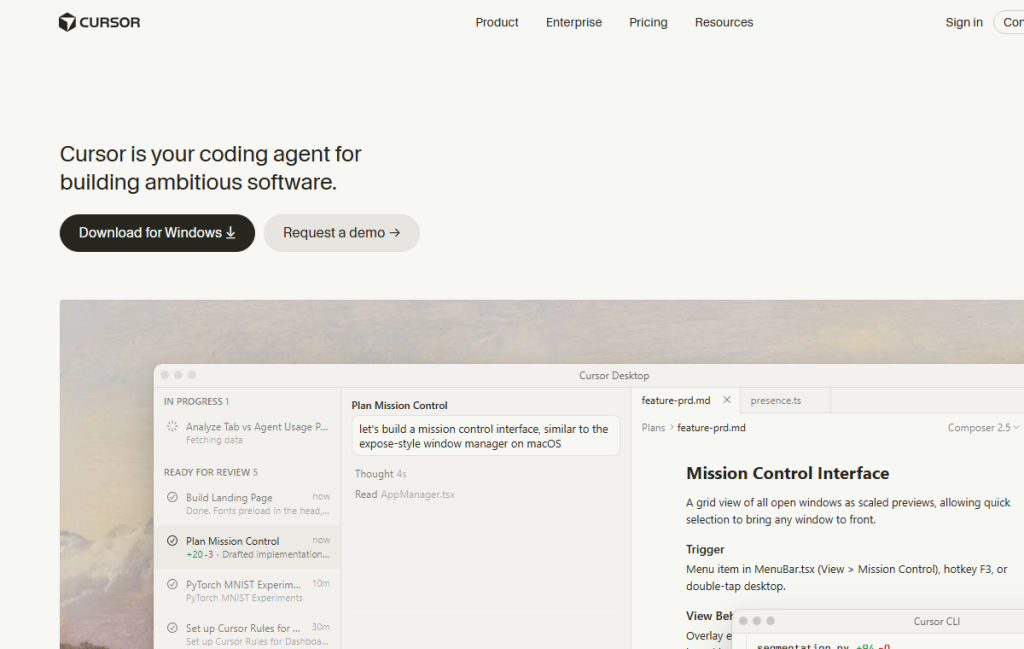
The official Cursor website describes it as a coding agent. Its interface shows task work, reading docs, planning and changes ready for review. The review step matters: AI can prepare a proposal, but architecture, security and maintainability remain the team's responsibility.
- Agentic tasks work when the scope is clear.
- Documentation context helps onboarding and older projects.
- Review is required because AI does not know your business risk.
Where it makes sense in practice
In a small company I would start Cursor on non-production tasks: explaining a module, preparing tests, migrating a small utility, documenting an API or refactoring a component with a good test suite. Only after trust is earned would I move to riskier changes.
- Ask about a specific file, function or bug, not the whole project.
- Have the AI explain the plan before it writes the patch.
- After changes, check the diff, tests, edge cases and performance.
Recommended workflow
A safe AI-editor workflow should slow down where risk is high and speed up where changes are reversible.
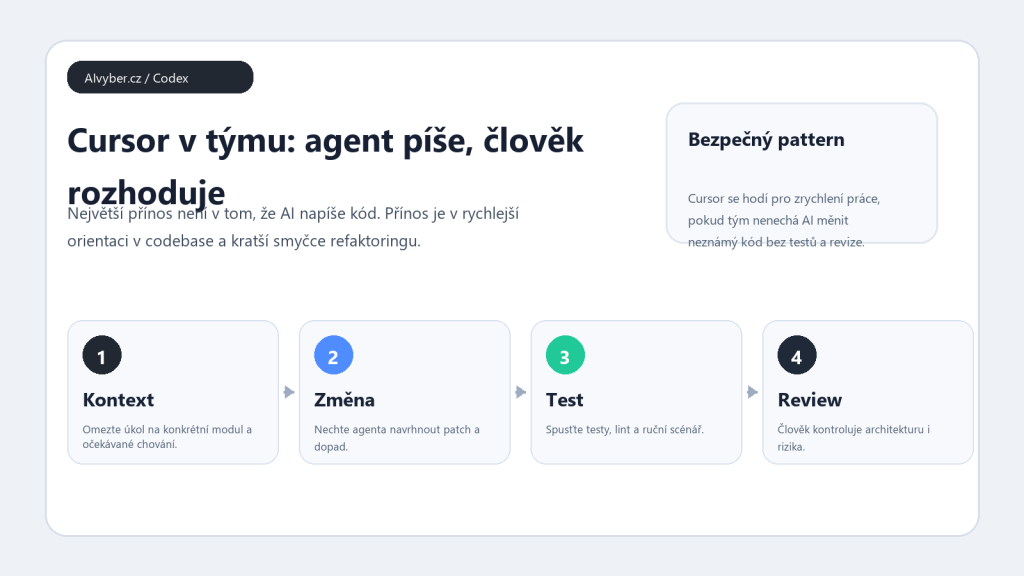
- Define the task in one sentence and add expected behavior.
- Attach relevant files or let the agent read only a specific area.
- Ask for a plan, risks and test strategy.
- Generate the patch and run automated tests.
- Before merge, perform human review and update documentation.
Limits and quality checks
Cursor can sound confident even when it misses domain rules. The main danger is authentication, authorization, database migrations, concurrency and financial calculations. Those changes need to be split into smaller parts and proven with tests.
- Do not let AI handle secrets, production config or migrations without rollback planning.
- Check that it did not add dependencies the team does not want to maintain.
- For generated tests, verify that they test behavior rather than implementation detail.
Who should consider it
Cursor is a good fit for developers and teams that want faster code navigation and routine refactoring. I would not give it free rein in a production repository for a non-technical requester. In a good process it is a fast colleague; in a bad process it creates debt quickly.
Recommended AI stack for implementation
| Service | Service description | Offer |
|---|---|---|
| NordVPN | VPN service for privacy protection and secure connections. | Open offer |
| Semrush | SEO and marketing platform for analysis and traffic growth. | Open offer |
| Notion | Workspace for notes, documentation, and project management. | Open offer |
| Hostinger | Web hosting and domains for fast website launch. | Open offer |
| Canva | Online design tool for graphics, presentations, and social media. | Open offer |
| Adobe | Creative tools for graphics, video, and digital content. | Open offer |
| Fiverr | Marketplace for freelancers and external specialists. | Open offer |
Note: We use affiliate links for listed services. If you purchase through them, we may earn a commission at no extra cost to you.
Safe Cursor workflow in an existing repository
Cursor is most useful in an existing project that already has tests, linting, and clear conventions. Do not start with a broad prompt such as “rewrite the app.” A better workflow is to give a small task, let the agent read the relevant files, and keep changes in small diffs. For refactoring, ask for a plan first, then the edit, then specific tests.
- For a bugfix, describe expected behavior, actual behavior, and the files where the issue likely lives.
- For code review, ask Cursor to look for regression risks, missing tests, and inconsistent contracts between modules.
- For documentation, define the audience: new developer, product owner, or technical support.
A production workflow still needs a separate branch, readable commits, and manual review. Cursor can speed up code navigation, but architecture, tests, and security remain the team’s responsibility.
Useful links: Cursor Docs, Cursor product overview, Cursor pricing.