Deep Research workflow: from assignment to verified briefing in 30 minutes
Deep Research today no longer means just “ask AI and take the first answer.” In practice, it is a guided process that combines search, source work, claim verification, and converting the results into a short briefing that can then be used in marketing, product research, sales, and editorial work. If the output is to be created within 30 minutes and still hold up under review, the workflow must be divided into clear steps and each must have a specific time limit.
The purpose of such a process is simple: shorten the time from assignment to usable background material, but without the typical weakness of generative tools, namely unsupported conclusions and unclear information origins. A verified briefing is not created because the model “writes better,” but because it is given a precisely defined goal, works with traceable sources, and every important claim is supported by primary or at least credible secondary material.
In this article, we will go through a workflow that can be used repeatedly: from receiving the assignment through collecting and filtering sources to the final briefing with citations, risks, and open points. We will focus only on practical steps, specific tools, and decision rules. If you are dealing with the broader context of working with AI assistants, this is also followed by an overview in the AI tools on AIVýběr section and thematically related articles in the Artificial Intelligence hub.
1. Start with an assignment that can be verified

The biggest share of errors arises right at the beginning. An assignment like “find out everything about the market” leads to bloated output that cannot be checked or used. For a Deep Research workflow, it is suitable to convert the assignment into three elements: the decision the briefing should support; the time horizon; and the allowed source types. Only then does it make sense to involve AI or a specialized research tool.
A practical rule: one research run should answer no more than three main questions. For example: How large is the segment? Who are the three main competitors? What are the regulatory barriers in the EU? If the team has more questions, split them into multiple separate runs. The output will then be shorter, easier to cite, and faster to verify.
What to do: write the assignment in one sentence in the format “We need to decide X by date Y based on sources Z.” Add a definition of “what we already know” and “what must not be used”; typically blogs without an author, unsourced presentations, or aggregators without methodology.
Who it’s for: product managers, marketers, analysts, and editors who need quick background material for a specific step, not an academic study.
When not to use it: if it is meant to be a legal opinion, investment recommendation, or medical assessment. In these cases, AI can help with orientation, but the final briefing must be created under the guidance of a qualified specialist and from primary documents.
What a good assignment looks like in practice
A good assignment has a measurable end point. For example: “Within 30 minutes, prepare a briefing on whether it makes sense to enter the German market with a B2B SaaS tool. Use only sources from 2023–2025, prefer official statistics, annual reports, and competitor pricing pages. Output: 8 points, 5 citations, 3 risks, 2 open questions.” Such an assignment limits both scope and output style and increases the chance that the model will not start filling in unsupported assumptions.
By contrast, a bad assignment is usually open-ended and without boundaries: “Find out something about the German market and recommend a strategy.” It lacks a decision framework, sources, and a limit. In such a mode, the model can easily mix press releases, old articles, and marketing texts and create a seemingly convincing but factually fragile document.
2. Choose the tool according to the type of research, not popularity
For a standard 30-minute workflow, it makes sense today to work with a combination of one generative assistant and one source search tool. Realistically usable services include ChatGPT, Claude, Perplexity, and Google Gemini. Each has different strengths: in some cases synthesis is better, elsewhere citations, elsewhere work with longer context.
For a quick briefing, the most practical tools are mainly those that can look up web sources and return links directly in the output. Perplexity is often the fastest for initial orientation in this respect because it builds the answer around cited sources. ChatGPT and Gemini are strong where you need to further structure the result, rewrite it into a briefing, or combine it with your own files. Claude is often useful when working with longer documents and clearly summarizing arguments.
What to do: divide the work into two phases. In the first, use a tool oriented toward source discovery; in the second, a tool suitable for synthesis and rewriting into a briefing. This saves both time and the number of subsequent corrections.
Who it’s for: teams that need repeatability. If one tool fails in citations or formatting, the second step stabilizes the output.
When not to use it: if your organization is not allowed to send sensitive data to public cloud services. In that case, it is necessary to check processing terms, enterprise plans, and possibly use an internal solution or an approved vendor.
Indicative prices and limits
For publicly available plans, prices change, so treat them only as indicative. ChatGPT Plus has long been around USD 20 per month, Perplexity Pro approximately around USD 20 per month, and Google One AI Premium with Gemini usually around USD 20 per month; exact terms must be verified on the official website. Claude offers various paid plans depending on region and type of use, again with variable pricing.
The decision rule is simple: if you do fewer than five research runs per week, one paid tool and manual verification are usually enough. Above that threshold, a combination of two services is worth it, because the time saved in finding sources and rewriting the briefing usually outweighs the monthly cost in the lower tens of dollars per user.
3. The first 10 minutes belong to source collection, not writing conclusions

A typical mistake is to start generating the briefing right away. It is much more reliable to reserve the first ten minutes purely for finding and pre-sorting sources. The goal is not to read everything, but to obtain a small set of materials that cover different perspectives: official data, a commercial view, competitors, and possibly the regulatory framework. For most topics, 6 to 10 sources are enough if they are high quality.
The practical filter works on three levels. First: primary sources, for example a regulator’s website, an annual report, product documentation, a pricing page, research methodology. Second: quality secondary sources, meaning a reputable media outlet or analytical firm with stated methodology. Third: supporting sources, for example an expert vendor blog, which must not carry the main argument. The more important the claim, the higher its source must be in this hierarchy.
What to do: create a mini table with the columns “source,” “type,” “date,” “what I take from it,” “risk.” If a source does not fit into one row, it is probably too broad for a 30-minute workflow.
Who it’s for: editorial teams, marketing teams, and sales, where it is important to quickly separate facts from sales claims.
When not to use it: when the topic depends on non-public data you do not have access to. In that case, AI will not help bypass missing materials; it will only create a feeling of certainty without data support.
How to quickly recognize a weak source
In a 30-minute mode, it is not worth wasting time on sources without a date, author, and methodology. If a website claims market size but does not say how it arrived at the number, do not use that figure as a main argument. The same applies to articles that merely copy numbers from another page without linking to the original document. AI models like to cite such texts because they are linguistically clear, but informationally they may be empty.
For competitor products, treat their official pricing page, product documentation, and changelog as the primary source. For market data, use a statistical office, regulatory institution, or clearly described research methodology. For technological parameters, product documentation is better than a comparison blog.
4. Verification must have a clear order: claim, source, counter-source
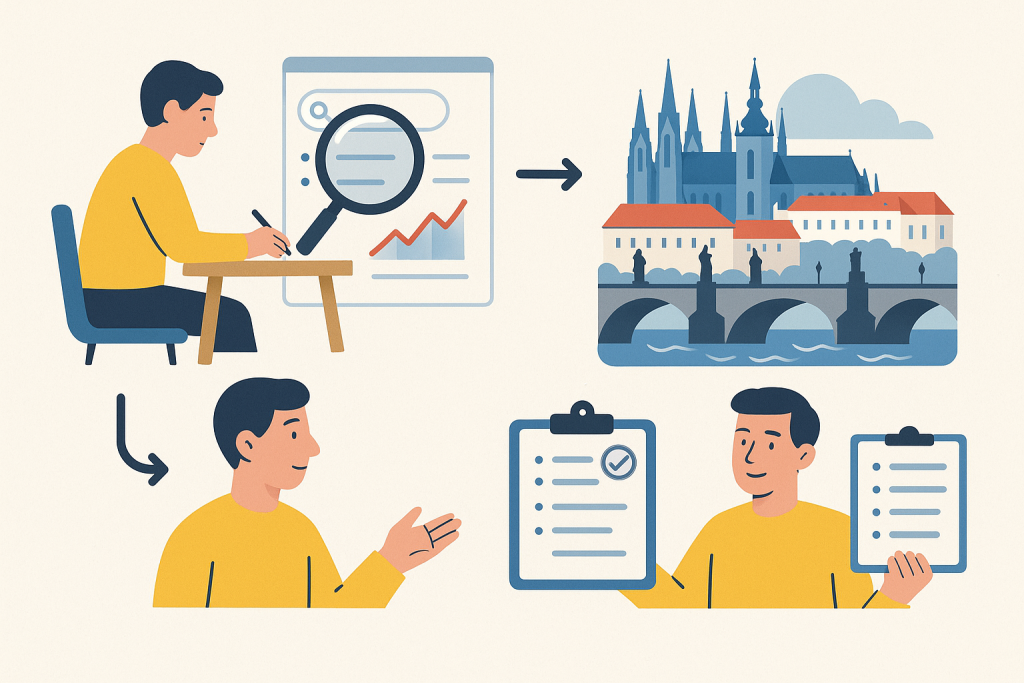
Once you have a basic set of materials, the most important part follows: verification. In practice, a simple rule works: “one important claim = at least one strong source and, if possible, one independent counter-source or confirmation.” This is not academic peer review, but a quick check that the briefing is not based on a single interpretation.
Start by extracting 5 to 8 key claims from the draft or notes. For example: “The competitor offers an enterprise plan from X EUR,” “The segment grew at a rate of Y,” “Market entry is slowed by license Z.” For each claim, add the URL, verification date, and a short note on whether the source is primary. If you find a contradiction against the source, the briefing must acknowledge it, not smooth it over.
What to do: use the labels “verified,” “partially verified,” “unconfirmed.” You will then save time in the briefing because you already know which points are solid and which are only a working hypothesis.
Who it’s for: anyone passing the briefing on to management, a client, or publishing it internally as a basis for decision-making.
When not to use it: if you have fewer than two usable sources for the main conclusion. In that situation, it is better to rewrite the briefing as “quick orientation” and explicitly mark that the decision is not yet supported by enough data.
How to involve AI in verification without blind trust
AI is useful for pulling out disputed points and suggesting what to check. For example, in ChatGPT or Claude you can paste a list of claims and instruct: “For each point, mark what requires a primary source and where there is a risk of definition confusion or an outdated date.” This is useful because the model can find weak points in the argument structure. But it must not decide on its own that something is true just because it sounds plausible.
Perplexity or Gemini are suitable for finding additional links, but even here it is necessary to click through to the original source. If the tool cites an article that itself is based on another study, only the original document should be treated as relevant. That is exactly the difference between “an answer with links” and genuinely verified research.
5. The briefing must be short, decision-oriented, and citable
The output of a Deep Research workflow should not be a long essay. It should be a briefing that someone can read in three to five minutes and know what follows from it. A proven structure is: goal, short answer, 5 to 8 verified points, 3 risks, 2 open questions, and a list of sources. If the briefing is longer than two standard pages without appendices, it often stops fulfilling the role of quick background material.
It is important to separate facts from interpretation. Fact: “The pricing page lists a plan from EUR 49 per user per month.” Interpretation: “The product is aimed more at SMB than enterprise.” Both can be useful, but they must not blur together in one sentence without labeling. The reader then knows what is hard evidence and what is an analytical conclusion.
What to do: use a consistent template. Ideally, each claim should be on a separate line with a link to the source. If the briefing is created repeatedly, introduce mandatory fields for “certainty status” and “date of last verification.”
Who it’s for: managers, account teams, product teams, and editorial teams, where the briefing is quickly forwarded and must be understandable even without verbal explanation.
When not to use it: when the requester expects a full study, benchmark, or due diligence. A briefing is an input into a decision, not its definitive documentation.
Recommended briefing template
A proven format looks like this: 1) goal and context in two sentences, 2) concise recommendation, 3) key findings in bullet points, 4) risks and limits, 5) what is missing for the next step, 6) sources. If you use AI to rewrite into the final form, have the output generated exactly in this scheme. The model then wanders less and more easily maintains a high information signal.
A useful detail: do not add everything you found to the briefing. Add only what has a direct impact on the decision defined in the assignment. Everything else belongs at most in notes or an appendix. This helps avoid the common problem where the briefing swells and loses usability.
6. Practical scenarios: marketing, product, sales, editorial
The same workflow can serve different teams, but they differ in which sources they prefer and what they consider sufficient evidence. In marketing, the goal is often to quickly verify competitor positioning or segment size. In product, it is more often about features, pricing, roadmap signals, and technical limitations. In sales, account structure, use cases, and public references are important. Editorial teams, in turn, deal with verifying claims before publication.
Marketing scenario: within 30 minutes, find out how three competitors communicate price and their main value proposition. Use the official homepage, pricing page, case studies, and changelog. The output is a short comparison table and two conclusions for adjusting the landing page. Do not use this if you need full-fledged brand tracking or representative customer research; that requires a different methodology.
Product scenario: verify whether the competition offers a specific integration or security certification. Primary sources are documentation, knowledge base, trust center, and release notes. AI helps well here by pulling out differences and ambiguities, but final confirmation must come through official documentation. Do not use this quick mode for a security audit or technical evaluation with architectural impact.
Sales scenario: prepare a briefing before a meeting with a client from a certain segment. Suitable sources are annual reports, press releases, careers page, partnership lists, and public interviews with management. The goal is not to “know everything,” but to uncover priority initiatives and risks. Do not use this as a substitute for account planning for large enterprise accounts with a longer sales cycle.
Editorial scenario: check a new claim about the market or product before publishing an article. Here it is necessary to maintain a higher verification bar than in an internal business briefing. One cited blog is not enough. If no credible primary material is available, it is better to soften the wording or omit the claim. For the topic of working with tools and comparing them, related content in the overviews at aivyber.cz/ai-nastroje is also useful.
What to do: adapt the briefing template to the specific role. Marketing needs comparison and messaging, product needs sources on features and technical limits, sales needs trigger events and business priorities, editorial needs precise citations and wording.
Who it’s for: teams that want one workflow but multiple output formats.
When not to use it: when the scenario requires primary field research, interviews, or non-public data. Deep Research speeds up orientation, but it does not replace your own data collection.
7. Limits: what 30-minute Deep Research cannot reliably solve
The biggest limitation is source quality. If the topic is covered mainly by marketing content, low-transparency surveys, or old articles, AI will not turn them into certainty. It will only assemble what is available more quickly. The second limitation is time: 30 minutes is enough for a verified briefing, but not for a deep market audit, a robust financial model, or a competitive benchmark with dozens of parameters.
The third limitation is related to hallucinations and confusion of definitions. For example, the model may merge two similar metrics, confuse revenue with funding, or confuse feature availability with its announcement on a roadmap. These errors do not look striking, and that is exactly why they are dangerous. That is why the workflow should include a mandatory step of manual checking of key claims and data.
What to do: introduce a stop rule. If after 20 minutes you do not have enough primary sources, switch the briefing into “preliminary orientation” mode and do not hide it. You will save time while also not convincing the team of a certainty that does not exist.
Who it’s for: team leads and editors who set output quality and need to maintain a reasonable standard without unnecessarily overshooting ambitions.
When not to use it: for decisions with high legal, security, or financial impact. There, a 30-minute briefing only makes sense as initial orientation for subsequent expert analysis.
Most common mistakes in practice
The first mistake: a briefing without a clear goal. The second: citing secondary sources where a primary document exists. The third: taking over numbers without a date and methodology. The fourth: confusing speed with quality, when the team takes the first coherently written text as the finished result. The fifth: missing evidence of exactly what the conclusion is based on. If the path from claim to source cannot be traced, the briefing is not verified.
A useful decision rule: as soon as one specific number, name, date, or regulatory condition is crucial to the conclusion, verify it manually in the original source. These are exactly the points where models make mistakes that are most costly for decisions.
FAQ
Is it really possible to complete the whole workflow within 30 minutes?
Yes, but only with a well-bounded assignment. Realistically, count on approximately 5 minutes to refine the goal, 10 minutes for source collection, 10 minutes for verification of key claims, and 5 minutes for the final briefing. If the topic spills into multiple directions or primary sources are missing, the time limit is a signal to narrow the assignment, not to rush conclusions.
Which tool is best for Deep Research?
There is no single universally best one. For quickly finding sources, Perplexity is often practical; for rewriting and structuring the briefing, ChatGPT or Gemini; for working with longer texts, Claude. Decide according to the type of work: sources, synthesis, or document work.
How many sources are enough for a verified briefing?
For most 30-minute briefings, 6 to 10 sources are enough if they include primary materials. More important than the number is quality and distribution. One official pricing page and one piece of documentation carry more weight than five blog overviews. For each main claim, there should be at least one traceable strong source.
Can the workflow be automated?
Partially yes. You can automate assignment templates, link collection, briefing format, and certainty-status labeling. What should not be fully automated is the final verification of key claims. It is precisely the manual check of the original source that distinguishes a usable briefing from quickly produced text with unclear reliability.
How do you know a briefing is not sufficiently verified?
There are three warning signs: missing links to original sources, too many general formulations without specific data, and conclusions based on a single article or a borrowed number without methodology. If you cannot show within a minute where a key claim came from, the briefing is not yet ready for use.
Conclusion
A functional Deep Research workflow does not stand on one “smart prompt,” but on discipline across several connected steps. First, narrow the assignment to the decision the briefing is meant to support. Then quickly collect a small set of quality sources. Next, verify several key claims against primary materials, and only at the end convert everything into a concise, citable briefing with a clearly marked degree of certainty.
If you follow this process, 30 minutes is usually enough for material that is usable in practice and at the same time does not conceal its limits. And that is the key point: the goal is not to create an impression of absolute certainty, but to deliver a fast and verified basis for the next step. That is exactly where Deep Research is most valuable — not as a replacement for expert work, but as a way to significantly shorten the path from assignment to evidence-based decision.
Recommended AI stack for implementation
Choose tools according to your budget and level of automation. Below is a direct overview of services for implementing the project.
| Service | Service description | Offer |
|---|---|---|
| NordVPN | VPN service for privacy protection and secure connections. | Open offer |
| Semrush | SEO and marketing platform for analysis and traffic growth. | Open offer |
| Make | Advanced visual automation for workflows and integrations. | Open offer |
| Hostinger | Web hosting and domains for fast website launch. | Open offer |
| Fiverr | Marketplace for freelancers and external specialists. | Open offer |
| Adobe | Creative tools for graphics, video, and digital content. | Open offer |
| Canva | Online design tool for graphics, presentations, and social media. | Open offer |
| Jasper | AI tool for marketing copy and content campaigns. | Open offer |
Note: We use affiliate links for listed services. If you purchase through them, we may earn a commission at no extra cost to you.
Links in the article
Sources of illustrative images
The custom illustrative image was created using the OpenAI Images API.
Doporučení ke čtení
AI 3D modeling workflow: from prompt through retopology to clean export

Gemini 2.5 vs. ChatGPT-5.4 for content writing: output quality, speed, price
Safe use of AI in a small business: 12 practical rules for sensitive data